


Blog
One core, many clients: the new Flare JavaScript client architecture
We recently reshaped the Flare JavaScript client from a single browser library and a few thin framework specific packages into a small family of packages built on a shared, platform-agnostic core. This post explains why we did it, what the core package exposes, how the browser and Node SDKs are built on top of it, why the React, Vue, and Svelte packages sit one level higher, and how anyone can use the same core to write a Flare JS client for a platform we do not ship ourselves.
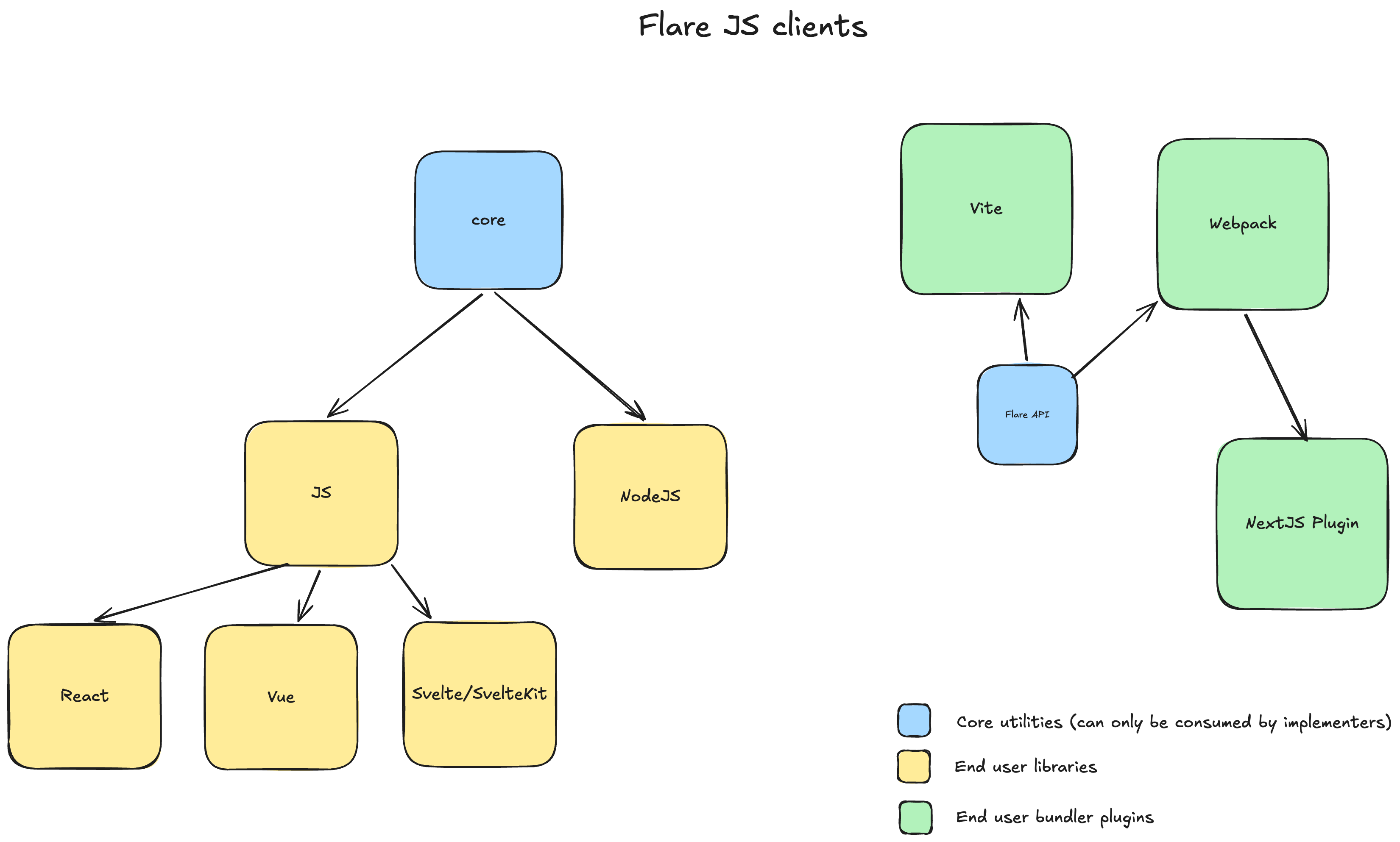
The diagram captures the whole idea. Blue are core utilities that only client authors consume. Yellow are the libraries an end user installs. Green are the bundler plugins for sourcemap upload, which live on their own track and are out of scope for this post.
The problem: one library, too many assumptions
The original @flareapp/js did one job well: catch errors in a browser and report them to Flare. The trouble was that "in a browser" was baked into every layer. The error pipeline reached for window to attach listeners, for fetch to read source files, and for the DOM and cookies to collect context. There was a single global place to stash breadcrumbs, because a browser tab has a single user doing one thing at a time.
While this works for the browser, it doesn't in a Node environment. A server process has no window, reads source from disk rather than over HTTP, and serves many concurrent requests at once. Each of those requests wants its own breadcrumbs and its own context, and none of it should leak into the request running next to it.
We had two bad options. Fork the library and maintain two copies of the same error pipeline, or thread typeof window === 'undefined' checks through a codebase that should actually not care in what environment or on what platform it's running. Both options become unmaintainable rather quickly, and neither leaves room for a third or fourth platform. So we decided to split the reporting pipeline into a platform agnostic core package instead.
The move: extract a platform-agnostic core
@flareapp/core now owns everything about reporting an error that does not depend on where the code runs:
- Configuration: the API key, version, stage, sampling rate, URL denylist, and the hook callbacks.
- Report building: turning a thrown value into a Flare
Report, including stack-trace assembly and code-snippet extraction. - Glows: the breadcrumb trail leading up to an error.
- Hooks: the
beforeEvaluateandbeforeSubmitpipeline that lets you drop or rewrite a report before it leaves. - Sampling, denylisting, and the
Apitransport that POSTs the finished report.
Core has zero platform dependencies. It never touches window, fetch, fs, or process. It defines the shape of the work and leaves the platform-specific parts as holes to be filled. The Flare class in core is the whole pipeline, and its constructor is the contract:
constructor(
    public api: Api = new Api(),
    private contextCollector: ContextCollector = () => ({}),
    private fileReader: FileReader = new NullFileReader(),
    private scopeProvider: ScopeProvider = new GlobalScopeProvider(),
) {}
Those four parameters are the seams. Everything that differs between a browser and a server is managed by implementing a custom provider or collector specific to the platform.
What core leaves out: the four seams
This is the heart of the design. Core decides what happens when an error is reported. The consumer decides how the platform-specific steps are carried out, by passing implementations of three small interfaces plus a transport.
1. ContextCollector: what context to gather
export type ContextCollector = (config: Readonly<Config>) => Attributes;
A plain function. Core calls it while building every report and merges the returned attributes into the payload. The browser version reads the URL, cookies, request headers, and referrer. The Node version reads the HTTP method, path, headers, and process info. Core does not know or care which.
2. FileReader: how to read source for snippets
export interface FileReader {
    read(url: string): Promise<string | null>;
}
To show the line of code where an error was thrown, core needs the source file. How you get that file is platform-specific, so core asks through one method and accepts null when the source is unavailable. The browser fetches it over HTTP. Node reads it from disk. The core package caches the result and extracts the relevant lines. (While Flare resolves the code on the server with sourcemaps, this file reader is handy to provide a fallback with minified code when the sourcemaps are not uploaded to Flare.)
3. ScopeProvider: what "current scope" means
export interface ScopeProvider {
    active(): Scope;
}
This is the seam that was really necessary for building a good Node client. A Scope holds the per-call mutable state: the glows, the pending custom attributes, and the current entry point. The core Flare class never stores that state directly. It always asks the provider for the active scope.
In the browser there is one scope for the page, so the default GlobalScopeProvider returns the same Scope every time. In Node, a single Flare instance serves many concurrent requests, and each one needs its own breadcrumbs. The Node scope provider, backed by AsyncLocalStorage, hands each in-flight request its own scope, so context never bleeds between concurrent requests. Core stays oblivious: it runs the same pipeline and calls active(), with no concept of concurrency at all.
4. The injected Api: transport
The core package ships a simple fetch-based Api that POSTs the report. Because it is injected rather than hardcoded, a consumer can replace it: a Node process might want a different timeout, an offline-first client might queue reports, and so on.
Plus one thing core cannot do for you: attach the listeners
Core can build and send a report once you hand it an error. It cannot decide when an error happens, because catching uncaught errors is inherently platform-specific. Somebody has to call window.addEventListener('error', ...) or process.on('uncaughtException', ...). That wiring lives in each client, not in core.
How @flareapp/js implements core
The browser client is thin. It subclasses core's Flare, fills the seams with browser implementations, and wires up the listeners:
// packages/js/src/index.ts

export class Flare extends CoreFlare {
    constructor(
        api: Api = new Api(),
        contextCollector: ContextCollector = collectBrowser,
        fileReader: FileReader = new FetchFileReader(),
        scopeProvider: ScopeProvider = new GlobalScopeProvider(),
    ) {
        super(api, contextCollector, fileReader, scopeProvider);
        this.setSdkInfo({ name: '@flareapp/js', version: CLIENT_VERSION });
    }
}

export const flare = new Flare();

if (typeof window !== 'undefined' && window) {
    // @ts-expect-error attach to window
    window.flare = flare;
    catchWindowErrors();
}
collectBrowser is the ContextCollector. FetchFileReader is the FileReader. The global scope is fine because a tab has one user. catchWindowErrors() attaches the error and unhandledrejection listeners and routes both into the singleton. That is the entire browser-specific surface. Every line of the error pipeline lives in core.
How @flareapp/node implements core
The Node client follows the shame shape, but injects different implementations of the required drivers. This shows why the new approach is so strong and flexible:
DiskFileReaderreads source from the filesystem instead of fetching it.AsyncLocalStorageScopeProvidergives each request its ownScope, and falls back to a shared scope when called outside any request. This is why two requests reporting errors at the same moment do not mix up their breadcrumbs.- A
ProcessHandlerManagerattachesprocess.on('uncaughtException')andprocess.on('unhandledRejection'), with configurable behaviour for whether to report and exit or report and continue. Before exiting, it callsflare.flush()to wait for in-flight reports to finish sending, so a crash does not drop the very report that explains it.
The Node client also extends Scope into a NodeScope with extra buckets for the request (method, path, headers) and the user (id, email).
How React, Vue, and Svelte ride on JS, not core
Here is a distinction the diagram makes on purpose. React, Vue, and Svelte are not new platforms. They all run in the browser. So they do not implement core. They depend on @flareapp/js as a peer dependency and reuse its flare singleton:
import { flare } from '@flareapp/js';
What each framework package adds is small and framework-shaped: a way to catch the errors the framework swallows before they ever reach window.onerror.
@flareapp/reactships aFlareErrorBoundarycomponent that hooksgetDerivedStateFromErrorandcomponentDidCatch, capturing the React component stack and forwarding it toflare.@flareapp/vueships aflareVueplugin that installsapp.config.errorHandlerand adds component-hierarchy and route context.@flareapp/svelteand@flareapp/sveltekitship a boundary component and error hooks, plus prop serialisation.
None of them re-implements stack-trace parsing, context collection, or transport. They catch a framework-specific error, add framework-specific context, and hand it to the same browser client every other browser page uses. That is why they sit a level below JS in the diagram, not next to it.
Build your own client: a React Native client
To showcase how easy it is to build a new client, we'll implement a minimal React Native client. React Native runs JavaScript with no DOM, catches errors through its own ErrorUtils global, and has a single app instance with one user. That maps cleanly onto the seams.
Step 1: the context collector
import { Platform } from 'react-native';
import type { ContextCollector, Attributes } from '@flareapp/core';

export const collectReactNative: ContextCollector = (): Attributes => ({
    'flare.entry_point.type': 'mobile',
    'os.type': Platform.OS,
    'os.version': String(Platform.Version),
});
A function in, attributes out. We tag the entry point as mobile and add a little device context. That is all core asks for.
Step 2: the file reader
The FileReader produces the code snippet around the failing line, and it is worth being precise about what that snippet is for. In the browser, FetchFileReader fetches the minified bundle the frame points at and sends that minified snippet along with the frame's line and column. It does not unminify anything on the client. The mapping back to your original source happens on Flare's servers: when a sourcemap is uploaded for that build, the backend remaps each frame's line and column and rebuilds the snippet from the sourcemap, discarding whatever minified snippet the client sent. The snippet the client produces is really a fallback, shown only when no sourcemap exists for that build.
That tells us what a React Native reader has to do, and what it can skip. In development Metro serves the bundle over HTTP, so we fetch it exactly like the browser does:
import type { FileReader } from '@flareapp/core';

export class MetroFileReader implements FileReader {
    async read(url: string): Promise<string | null> {
        if (!url.startsWith('http://') && !url.startsWith('https://')) {
            return null; // production bundle, leave it to Flare to resolve sourcemaps
        }
        try {
            const response = await fetch(url);
            return response.ok ? await response.text() : null;
        } catch {
            return null;
        }
    }
}
In a production build the bundle lives on the device as an AOT compiled HBC bytecode file, which is impossible to get a fallback snippet from and the frame URLs are not something we can fetch over HTTP, so read() returns null. That is fine, as long as you upload your sourcemaps to Flare, the backend maps each frame to the original file, line, and column from the line and column numbers alone, and reconstructs the original snippet itself.
Step 3: the scope provider
A mobile app has one user and one logical context, exactly like a browser tab. So we do not need to write a provider at all. We reuse the one core already ships:
import { GlobalScopeProvider } from '@flareapp/core';
You only implement the seams your platform actually needs. The per-request AsyncLocalStorage machinery is Node's concern, and a React Native author doesn't need to think about it.
Step 4: assemble the client
// packages/react-native/src/index.ts

import { Api, Flare as CoreFlare, GlobalScopeProvider } from '@flareapp/core';
import { collectReactNative } from './collectReactNative';
import { MetroFileReader } from './MetroFileReader';
import { PACKAGE_VERSION } from './env';

export class Flare extends CoreFlare {
    constructor() {
        super(
          new Api(),
          collectReactNative,
          new MetroFileReader(),
          new GlobalScopeProvider(),
        );
        this.setSdkInfo({ name: '@flareapp/react-native', version: PACKAGE_VERSION });
    }
}

export const flare = new Flare();
Step 5: catch the errors
The only platform-specific wiring left is hooking React Native's global error handler and forwarding to the pipeline:
// packages/react-native/src/index.ts

const previousHandler = ErrorUtils.getGlobalHandler();

ErrorUtils.setGlobalHandler((error, isFatal) => {
    flare.reportSilently(error);
    previousHandler?.(error, isFatal);
});
There you have it, a working and completely new Flare client. Three small files, one of which is a single import, plus a handful of lines to attach the handler. Everything else, the stack-trace parsing, the glows, the hooks, the sampling, the transport, comes from core unchanged.
Why this makes new clients cheap
The payoff is that the expensive, fiddly, easy-to-get-wrong part of an error tracker, the reporting pipeline, is written once and shared. A new client is no longer a rewrite. It is a few implementations of small interfaces:
- A
ContextCollectorfunction that returns whatever context the platform can offer. - A
FileReaderthat returns source when it can andnullwhen it cannot. - A
ScopeProvider, but only if "current scope" means something other than "one global scope", which it usually does not. - A bit of glue to catch the platform's uncaught errors.
Each seam is independently understandable and independently testable. You can reason about the context collector without knowing anything about stack traces, and you can swap the file reader without touching the scope logic. That isolation is what keeps the browser and Node clients as thin as they are, and it is what makes many more clients possible.
We should be honest about the edges. Core today is deliberately lean, and it does not yet cover everything the other error trackers out there offer: automatic breadcrumb capture, built-in user identification across platforms, transport-level retry and batching, and report deduplication are all still on the roadmap. The architecture is what makes adding them attractive and easy: anything we build into core lands in every client at once, browser, Node, React, Vue, Svelte, and whatever we decide to build next.
Continue reading
Introducing: Dark mode for Flare
We heard you, so here it is: a Dark Mode for Flare!

Dries
Automatic breadcrumbs recording and GDPR consent
The latest JavaScript client can record breadcrumbs for you: the clicks, navigations, and HTTP requests a user made before an error, so you can retrace their steps. We also added a consent hook, so nothing is sent to Flare until a visitor accepts your cookie or GDPR banner.
Dries
Subscribe to Backtrace, our quarterly Flare newsletter
No spam, just news & product updates
