I've always thought Flare's AI generated solutions were one of the coolest things we built in the early AI days: a short suggested fix next to your error, written by an LLM from the stack trace and a snippet of the failing code. We shipped them in March 2023 and this April we removed them.
Frankly put they lasted a lot longer than they should've. In the era of agentic AI, these AI solutions felt ancient and on top of that, they were taking up valuable space in the UI. Nobody has complained since the removal, so it seems the hunch was right.
Let's quickly go over where the old AI solutions were failing, and what we're replacing them with: an MCP server that handles real triage, a CLI with an agent skill, and quick prompts to copy right in the UI.
Why the AI solutions (often) sucked
When we added solutions to Flare back in 2019, a fix was proposed by an algorithm in the PHP client and sent to the Flare API together with the error report. Some solutions even contained runnable code or commands: forgot to run a migration, and the error page offered to run php artisan migrate for you.
In 2023, a few weeks after OpenAI opened up the ChatGPT API, we added an AI solution resolver on top: gpt-3.5-turbo came up with solutions dynamically from the thrown error, a code snippet, and the stack trace. Back then, when we were all still copy-pasting code into a ChatGPT window, this was a genuinely cool feature. It had its annoyances too: the runnable solutions caused a minor RCE for apps with debug mode enabled in production, which turned out to be a lot of apps.
We upgraded the model a couple of times, ending on gpt-4.1-mini. Better prose every time, same problem: not enough context and that's the point of this post: fixing an error takes context, and that context lives with your coding agent and your repo, not on our servers. The feedback loop from error to fix should be as short as possible. So, like just about every developer product this year, we built two surfaces for agents, an MCP server and a CLI, plus a button that gets an error into them fast, and docs an agent can read.
The MCP server handles real triage now
Our MCP server started out as little more than error search. Today your agent can fetch occurrences with full stack traces, resolve, snooze, and assign errors, leave notes, pull performance data like slow routes and queries, trace requests and jobs, and search your logs. The investigation and the cleanup afterwards both happen without you ever switching back to Flare in the browser.
Connecting is one command:
claude mcp add --transport http flare https://flareapp.io/mcp
Your browser opens, you approve the connection, done. Connections are read-only by default and scoped to the teams and projects you choose. You decide per connection whether an agent can only look or also act. We wrote about the OAuth flow in detail last week.
A CLI and an agent skill
Whether your agent should use the CLI or the MCP server is mostly personal preference. I've long preferred the CLI because it keeps my agent's context light, but lately the MCP server has been winning me over with how fast it is to hook up. The CLI covers the same ground as the MCP server:
composer global require spatie/flare-cli
flare login
There's also a published agent skill that teaches your agent the CLI and the triage workflow. The docs compare the skill and the MCP server so you can pick one instead of installing both.
A Copy for AI button on every error
Every error card now has a "Copy for AI" button. It puts a pre-made prompt on your clipboard in one of three formats. CLI and MCP are a short instruction telling your agent to investigate the error through that tool, with the error and project IDs filled in. Markdown is a full dump of the latest occurrence, stack trace, snippets, and context included, so it works with any AI tool that accepts pasted text, no Flare connection needed.
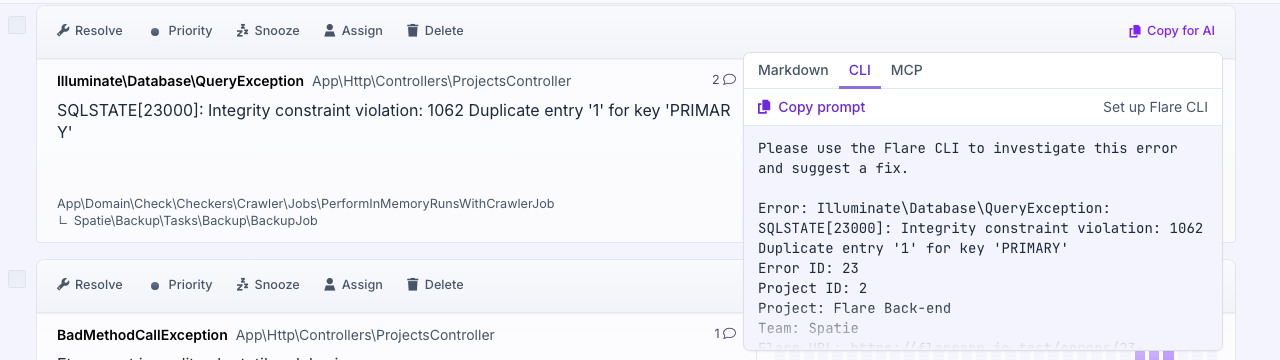
The button remembers which format you picked, so from the second error on it's a single click. Paste the prompt into Claude Code, Codex, or whatever tool is hyped up on Reddit this week and the agent pulls the occurrence and gets to work. This is the fix-an-error flow we wanted solutions to be, except the model can actually see your code.
Docs your agent can read
Good docs still matter, and these days agents read them too. Append .md to any Flare docs URL and you get the page as plain markdown, navigation included:
curl https://flareapp.io/docs/flare/general/our-mcp-server.md
A markdown response burns far fewer tokens per page, and the good this is: your agent will discover this on its own.
We also try to stay on top of the emerging patterns AI agents use for service and content discovery: an MCP server card, an agent skills index, and an API catalog are all available under /.well-known/. We use Flare with AI every day ourselves, so when a new convention helps an agent find its way around, we want to support it early.
A peek at what's cooking
Agentic loops are hot! An AI agent that looks at Flare, tweaks some code, runs your sandboxed test suite (and maybe breaks out), and then checks whether the error is actually resolved, all in one session. We're experimenting with running those loops on our infrastructure, where a hosted agent picks up a new error, a performance regression, or a suspicious pattern in your logs and investigates it the way a developer would.
No promises on dates. Solutions will return in some form, built on all of the above, and we won't ship them until they're clearly better than what we removed.
Try it
The Copy for AI button is live on every error card. Connect your MCP client to https://flareapp.io/mcp, or install the CLI with composer global require spatie/flare-cli. The MCP docs and CLI docs have the details. And if you were using AI solutions and disagree with the removal, please tell us. That feedback shapes what the next version of Flare will look like.
Continue reading
Introducing: Dark mode for Flare
We heard you, so here it is: a Dark Mode for Flare!

Dries
Automatic breadcrumbs recording and GDPR consent
The latest JavaScript client can record breadcrumbs for you: the clicks, navigations, and HTTP requests a user made before an error, so you can retrace their steps. We also added a consent hook, so nothing is sent to Flare until a visitor accepts your cookie or GDPR banner.
Dries
Subscribe to Backtrace, our quarterly Flare newsletter
No spam, just news & product updates