


 Flare
Flare
 PHP
PHP
 JavaScript
 Protocol
Quick start
By the end of this guide, the Flare client is running in your Vue app: it reports errors with the component that threw and its parent chain, shows your real source code in stack traces instead of minified code, and traces your page loads, navigations, and component mounts.
Looking for the V1 docs of the JavaScript SDK? You can find them here.
Install and start the client
You need a Flare account and a project key, which you can find on your project's settings page. Flare's Vue integration uses two packages: @flareapp/js, the core client that catches errors and sends them to Flare, and @flareapp/vue, which adds the plugin, the error boundary, router tracing, and component profiling on top. @flareapp/vue requires Vue 3. Vue 2 is not supported.
The interactive guide below is the fastest way to get started. It fills in your real project key for you when you are logged in, and gives you copy-paste commands to install the packages and start the client. Or you can let an AI agent do all the work for you by using the install prompt.
This guide covers every supported setup. Follow only the steps that match your project: conditional instructions start with a bold "If ..." line describing when they apply. Steps without such a line always apply. Install commands use
npm install. Swap that prefix for the project's own package manager:yarn add,pnpm add, orbun add. ReplacePROJECT PUBLIC KEYwith the project's public key. You can find it in the project settings on https://flareapp.io.
Step 1: Install the package using NPM, Yarn, pnpm, or Bun
If you don't upload sourcemaps to Flare:
npm install @flareapp/js @flareapp/vue
If you use Vite and upload sourcemaps to Flare:
npm install @flareapp/js @flareapp/vue @flareapp/vite
If you use Webpack and upload sourcemaps to Flare:
npm install @flareapp/js @flareapp/vue @flareapp/webpack
If you use Next.js and upload sourcemaps to Flare:
npm install @flareapp/js @flareapp/vue @flareapp/nextjs
Step 2: Register Flare & configure
Register the Flare Vue error handler in your app.js file:
If you upload sourcemaps to Flare:
In app.js:
import { createApp } from "vue";
import { flare } from "@flareapp/js";
import { flareVue } from "@flareapp/vue";
import App from "./App.vue";

// Only enable Flare in production, we don't want to waste your quota while you're developing:
if (process.env.NODE_ENV === 'production') {
    flare.light();
}

const app = createApp(App);

flareVue(app);

app.mount('#app');
If you don't upload sourcemaps to Flare:
In app.js:
import { createApp } from "vue";
import { flare } from "@flareapp/js";
import { flareVue } from "@flareapp/vue";
import App from "./App.vue";

// Only enable Flare in production, we don't want to waste your quota while you're developing:
if (process.env.NODE_ENV === 'production') {
    flare.light('PROJECT PUBLIC KEY');
}

const app = createApp(App);

flareVue(app);

app.mount('#app');
If you enable tracing:
Tracing shows you where time goes during a page load, a navigation, and the requests your page makes. Add this inside the same production check, after flare.light(). Read more in how tracing works and sampling.
In app.js:
flare.configure({
    enableTracing: true,
    // Sends 10% of traces. Raise it for more detail, lower it to save quota.
    tracesSampleRate: 0.1,
});
If you use Vite and upload sourcemaps to Flare:
Configure Vite to upload sourcemaps to Flare:
In vite.config.js:
import { defineConfig } from 'vite';
import flareSourcemaps from '@flareapp/vite';

export default defineConfig({
    plugins: [
        flareSourcemaps({
            apiKey: 'PROJECT PUBLIC KEY'
        }),
    ],
});
If you use Webpack and upload sourcemaps to Flare:
Configure Webpack to upload sourcemaps to Flare:
In webpack.config.js:
const { FlareWebpackPlugin } = require("@flareapp/webpack");

module.exports = {
    // ...
    devtool: "source-map",
    plugins: [ new FlareWebpackPlugin({ apiKey: "PROJECT PUBLIC KEY" }) ],
};
If you use Next.js and upload sourcemaps to Flare:
Wrap your Next.js config with withFlareSourcemaps in next.config.mjs:
In next.config.mjs:
import { withFlareSourcemaps } from '@flareapp/nextjs';

export default withFlareSourcemaps({
    // your normal Next.js config
}, {
    apiKey: 'PROJECT PUBLIC KEY',
});
Step 3: Connect your project key
If you upload sourcemaps to Flare:
When you install Flare's sourcemap build plugin, the build plugin injects your public key so flare.light() can run without an explicit key. Make sure you add the domains of your application in the project settings on Flare.
If you don't upload sourcemaps to Flare:
Pass your public key directly to flare.light('PROJECT PUBLIC KEY') and make sure you add the domains of your application in the project settings on Flare.
Step 4: Verify your setup
Add this code temporarily to verify everything is working:
In app.js:
flare.test();
If you use Vite and upload sourcemaps to Flare:
Run your Vite build command. You should see the following lines in the output:
@flareapp/vite: Uploading xx sourcemap(s) to Flare.
@flareapp/vite: Successfully uploaded all sourcemaps to Flare.
If you use Next.js and upload sourcemaps to Flare:
Run next build. You should see the following lines in the output:
@flareapp/webpack: Uploading 4 sourcemap(s) to Flare.
@flareapp/webpack: Successfully uploaded all sourcemaps to Flare.
Prefer to install and configure the client by hand, or not logged in? Install the packages:
npm install @flareapp/js @flareapp/vue
yarn add @flareapp/js @flareapp/vue
pnpm add @flareapp/js @flareapp/vue
bun add @flareapp/js @flareapp/vue
Then add this near the top of your application's entry file, before any other code runs, so the client can catch errors as early as possible:
import { flare } from '@flareapp/js';

if (process.env.NODE_ENV === 'production') {
    flare.light('YOUR PROJECT KEY');
}
The guard keeps the client off during local development, so you don't use up your quota while you work.
flare.light() switches on the client's automatic error listeners. From that point on, unhandled errors and unhandled promise rejections are caught and sent to Flare on their own, without any extra code from you.
Catch Vue errors
flare.light() catches errors outside of your component tree, but an error thrown inside a component, for example during setup, rendering, a lifecycle hook, a watcher, or an event handler, needs the flareVue plugin. Register it on your app:
import { flareVue } from '@flareapp/vue';
import { createApp } from 'vue';
import App from './App.vue';

const app = createApp(App);
app.use(flareVue);
app.mount('#app');
The plugin hooks into app.config.errorHandler, Vue's own catch-all for component errors, so it reports every one of those errors to Flare on its own. You don't need to wrap anything for this to work.
If you also want to show a fallback UI instead of a blank screen when an error happens, wrap that part of your tree in FlareErrorBoundary:
<script setup>
import { FlareErrorBoundary } from '@flareapp/vue';
</script>

<template>
    <FlareErrorBoundary>
        <RouterView />
        <template #fallback>
            <p>Something went wrong.</p>
        </template>
    </FlareErrorBoundary>
</template>
RouterView needs no import here: Vue Router registers it globally once you call app.use(router).
An error caught by the boundary is still reported to Flare exactly once, using the boundary instead of the plugin. Read more in error boundary, including how to reset the boundary on navigation and read the caught error in your fallback UI.
Check that errors arrive
Add a component that throws right away, so flareVue actually catches it:
<script setup>
throw new Error('My first Flare error');
</script>
Render this component somewhere inside your app, then open your project in Flare. The error shows up within a few seconds, with its message, a stack trace, the component that threw, and the browser it came from. Remove the test component once you have confirmed it arrived.
See your real source code
If you bundle your code for production, the stack trace above points at minified, bundled output instead of the file and line you actually wrote. Fix that by uploading a sourcemap after every build, using the Vite or Webpack plugin. The Vue integration uses the same plugins as the core JavaScript client. Follow see your real source code in the JavaScript quick start for the install and config steps, then come back here.
Turn on tracing
You've now got error reporting working. The remaining steps add tracing and component profiling. You can stop here and come back to them later; nothing below is required to get errors into Flare.
Tracing shows you where time goes during a page load, a client side navigation, and the requests your page makes. Turn it on with flare.configure():
import { flare } from '@flareapp/js';

flare.configure({
    enableTracing: true,
    tracesSampleRate: 1,
});
enableTracing defaults to false, so tracing is off until you set it. tracesSampleRate controls what fraction of traces gets sent, from 0 to 1, and defaults to 1, meaning every trace is sent. Lower it once you have real traffic, so you don't ship a trace for every single page load.
Once tracing is on, the browser client automatically traces page loads, client side navigations, and the fetch or XMLHttpRequest calls your page makes. Without a router integration, a navigation span is named by the raw URL it navigated to, and the client does not time component mounts. The next two steps add both.
Read more in how tracing works and what gets traced.
Trace navigations
You can stop here and come back later; nothing below is required to get errors into Flare.
Unlike some other framework integrations, there is no separate function to call for router tracing. Pass your Vue Router instance to flareVue as the router option, and the plugin wires it in for you:
import { flare } from '@flareapp/js';
import { flareVue } from '@flareapp/vue';
import { createApp } from 'vue';
import { createRouter, createWebHistory } from 'vue-router';
import App from './App.vue';
import Home from './pages/Home.vue';
import Product from './pages/Product.vue';

const router = createRouter({
    history: createWebHistory(),
    routes: [
        { path: '/', component: Home },
        { path: '/products/:id', component: Product },
    ],
});

flare.light('YOUR PROJECT KEY');

const app = createApp(App);
app.use(router);
app.use(flareVue, { router });
app.mount('#app');
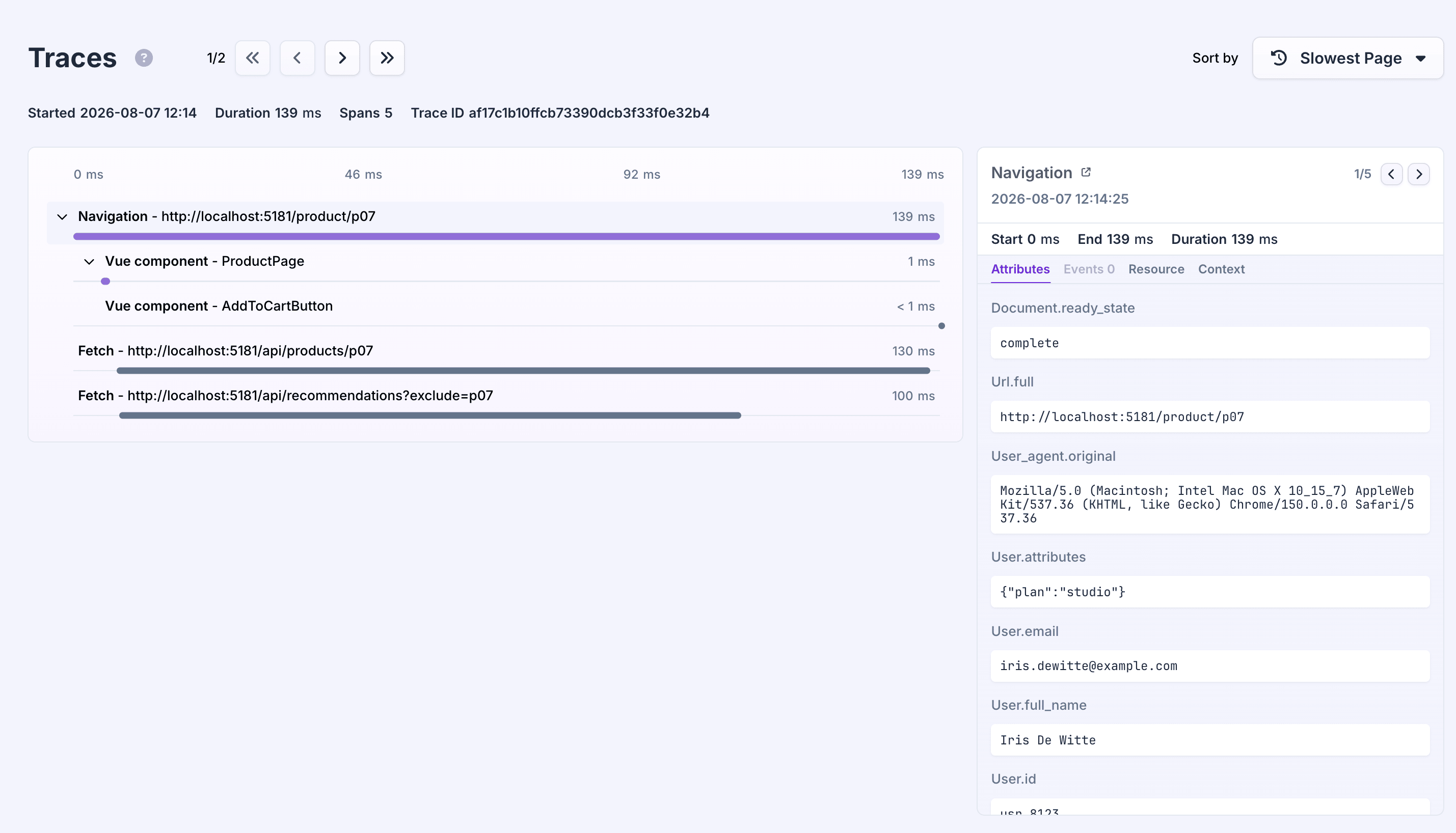
Read more in tracing introduction for Vue.
Profile components
You can stop here and come back later; nothing below is required to get errors into Flare.
As with router tracing, there is no separate component to wrap. Pass the names of the components you want to time to flareVue as the profileComponents option:
import { flare } from '@flareapp/js';
import { flareVue } from '@flareapp/vue';
import { createApp } from 'vue';
import { createRouter, createWebHistory } from 'vue-router';
import App from './App.vue';
import Home from './pages/Home.vue';
import Product from './pages/Product.vue';

const router = createRouter({
    history: createWebHistory(),
    routes: [
        { path: '/', component: Home },
        { path: '/products/:id', component: Product },
    ],
});

flare.light('YOUR PROJECT KEY');

const app = createApp(App);
app.use(router);
app.use(flareVue, {
    router,
    profileComponents: ['Product'],
});
app.mount('#app');
Each name in the array is matched against the component's own name, so Product mounting records a span nested under the current page load or navigation. This only records mounts, not re-renders, and it needs enableTracing on, which you already set in the tracing step above.
Read more in profiling introduction for Vue.
Common problems
See common problems in the JavaScript quick start for problems that apply to every JavaScript app, such as the client never being started or a wrong project key. Below is one that is specific to Vue.
Only one app is covered per app.use(flareVue) call. If your page creates more than one Vue app instance, for example when mounting a few independent widgets with their own createApp() calls, register the plugin on each app separately. flareVue only hooks into the app.config.errorHandler of the app instance you pass it to.
Next steps
- Error boundary and error handling: fallback UI, resetting on navigation, and the plugin's lifecycle hooks.
- Reporting errors: report caught errors and send log messages by hand.
- Client hooks: change or drop a report before it's sent.
- Sourcemaps: sourcemaps for Vite, Webpack, Next.js, Laravel Mix, and manual uploads.
- Adding custom context and identifying users.
- Tracing introduction for Vue, plus sampling and manual spans.
- Profiling introduction for Vue.
- API reference and configuration reference.