


 Flare
Flare
 PHP
PHP
 JavaScript
 Protocol
Introduction
If you haven't turned on tracing yet, start with turn on tracing in the quick start. This page covers the Svelte-specific half: timing your components. You can stop after the error reporting steps in the quick start and come back to this later. It isn't required to get errors into Flare.
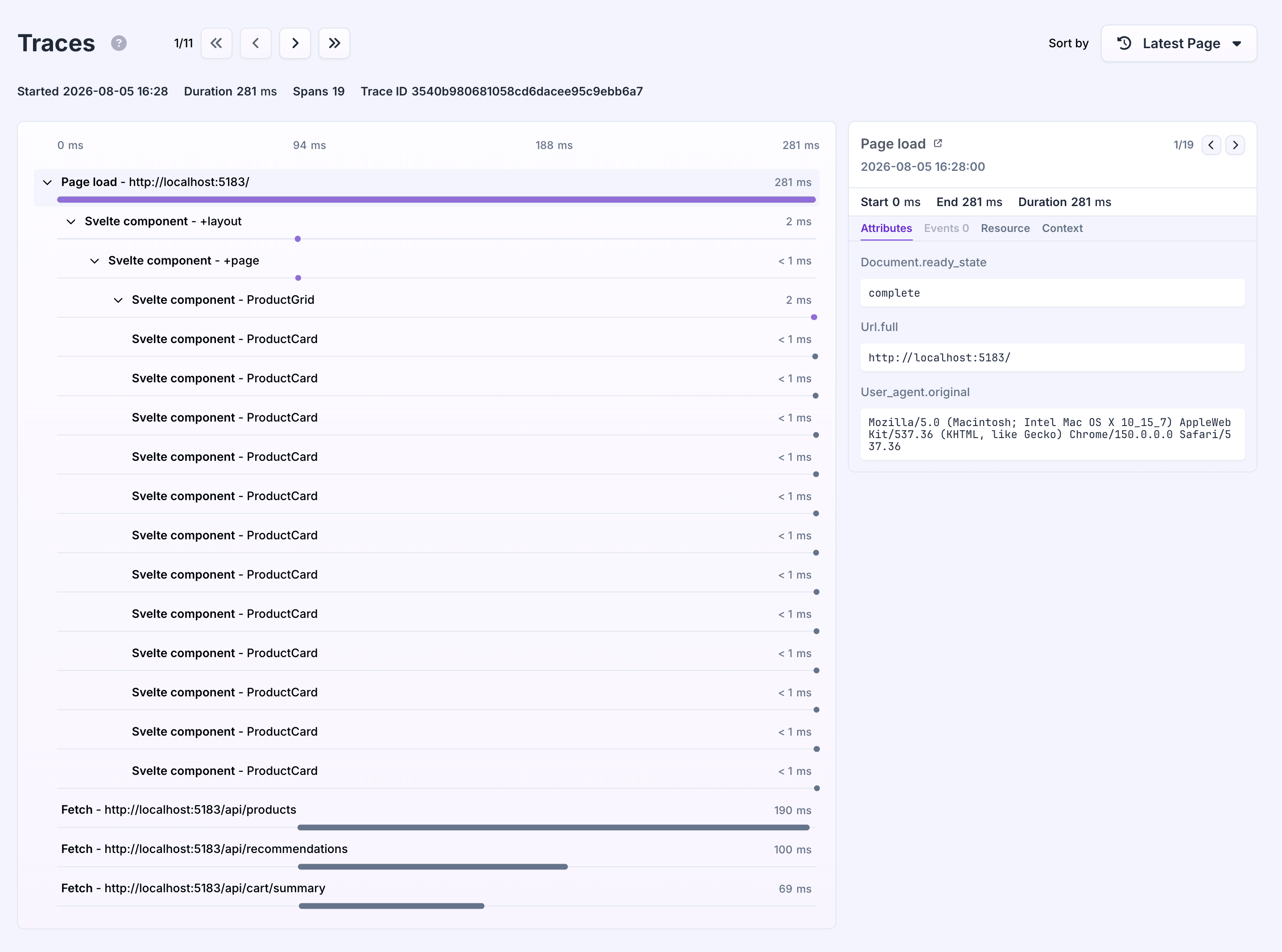
Read more in how component profiling works, which explains what a mount span is and how it nests under a trace.
How Svelte profiles a component
Svelte profiles components differently from every other framework Flare supports: it happens at build time, through a preprocessor, not at runtime. There is no component to wrap and no option you pass when starting the client. Instead, you list the components you want to time in svelte.config.js, and Flare's Svelte preprocessor injects the timing code into those components while your app builds.
Pass profileComponents to withFlareConfig in svelte.config.js:
// svelte.config.js
import { withFlareConfig } from '@flareapp/svelte/config';

export default withFlareConfig({
    // your existing svelte config
}, {
    profileComponents: ['ProductPage', 'ProductGallery'],
});
Because this is a build time setting, changing profileComponents needs a restart of your dev server before it takes effect. Saving svelte.config.js alone does not re-run the preprocessor on an already running dev server.
Component tracking and profiling are separate
withFlareConfig also controls componentTracking, a different feature that feeds the component hierarchy into your error reports (see error boundary). componentTracking defaults to true, so it's already on even if you never touch this config. profileComponents defaults to false, so no component is timed until you list one. Turning one on does not turn on the other:
export default withFlareConfig({
    // your existing svelte config
}, {
    componentTracking: true, // default, feeds error reports
    profileComponents: ['ProductPage'], // off by default, times mounts
});
An empty array (profileComponents: []) is treated the same as leaving it out: nothing is profiled.
Which name to match
profileComponents is not matched against a component's bare file name. It's matched against a route aware profile name, which is only different from the bare name for SvelteKit's route files, the ones starting with +, such as +page.svelte, +layout.svelte, and +error.svelte.
An ordinary component keeps its bare name. src/lib/components/ProductGallery.svelte resolves to the profile name ProductGallery, so profileComponents: ['ProductGallery'] matches it directly, exactly like the quick start example above.
A route file is different, because SvelteKit projects reuse the same file name, +page.svelte, for every single route. Matching by bare name would make every page in your app match the same entry. Instead, Flare builds the profile name from the file's path under your routes directory (src/routes by default, or whatever kit.files.routes is set to). A page at src/routes/products/[id]/+page.svelte gets the profile name products/[id]/+page, not +page. A route file directly at the root of your routes directory has no path to prepend, so src/routes/+page.svelte stays the bare +page, and a route group like (marketing) is not stripped either, so src/routes/(marketing)/about/+page.svelte resolves to (marketing)/about/+page:
export default withFlareConfig({
    // your existing svelte config
}, {
    profileComponents: ['products/[id]/+page'],
});
This only applies to files starting with +. Regular components anywhere in your project, including ones inside src/routes that aren't route files themselves, keep their bare name.
profileComponents: true is a debugging aid
profileComponents also accepts true instead of an array. That profiles every component the preprocessor sees, which is useful while you're looking for a slow component locally. It is not something to ship. A trace stops recording new spans once it hits maxSpansPerTrace (1024 by default, see the configuration reference), and a real page can easily mount more components than that. The mount spans you actually care about can end up past that limit, alongside spans for components you were never trying to time. Pass an array of the specific profile names you want to time instead, and add or remove entries as you narrow down a problem.
What gets recorded
Only mounts. A mount span covers the component mounting, once. Re-renders and updates after that are not recorded. If a component re-renders slowly after it has already mounted, this will not show you that.
Nested under the active trace. A mount span nests under whatever browser_pageload or browser_navigation span is open while the component mounts, and under any matched ancestor component that already started its own span.
A profiled component's span covers everything it renders. The span starts when the component initializes and ends in its onMount callback. Svelte initializes components top-down and runs onMount bottom-up, so the span also covers the mounting of the components inside it, whether those are profiled or not. Listing one component near the top of your tree gives you a single total for that part of the app, not a breakdown per component. List the components inside it too if you want to see where that time goes. Content inside a pending {#await} block is the exception: the component does not wait for that branch, so its own span ends before the awaited content starts mounting.
A component under a surviving ancestor is re-homed onto the current root. A profiled component's parent span is resolved once, when the component initializes, not when it mounts; normally that happens at the same moment. But a SvelteKit +layout.svelte that survives a navigation does not reinitialize, so its own parent reference stays fixed to whatever trace was active the first time it was created. Any new child that initializes underneath that layout after a navigation, for example the components of the page it renders, would otherwise inherit that stale reference and try to attach to a trace that has already closed. Flare avoids that: at each child's own init, it checks whether the reference it inherited still points at the current live trace, and falls back to that live trace instead if it doesn't. The surviving layout itself is unaffected by this, since it never reinitializes and so never gets a new mount span of its own for the navigation.
A span can still be dropped between init and mount. The parent is resolved at init, but the span itself is only recorded once onMount runs. If the root it was going to attach to has closed by then, for example because tracing stopped or that trace already shipped, the span is silently dropped instead of being attached to a trace that no longer exists.
Only while enableTracing is on. Component profiling is part of tracing. With enableTracing off, the preprocessor's injected code runs but no span is recorded.
Read more
- Tracing introduction for Svelte: trace navigations with SvelteKit's router.
- How component profiling works: the shared ideas behind mount spans across frameworks.