Until now, the JavaScript client just reported errors and any glows you manually attached. In the newly released version (2.10.0), we have added automatic breadcrumb recording.
Alongside to automatic breadcrumbs, we also added a way to enable or disable the client from the callbacks of your GDPR or cookie banner libraries. The JS client does not set any cookies of its own. But when it reports an error, it reads data like the user-agent and the cookies in the browser, which you might want to gate behind a consent banner.
What is recorded exactly?
- Clicks, by element, so you can see which button someone pressed
- Form changes, when a field is filled in and left
- Fetch and XHR requests, with the method, the URL and the status that came back
- Route changes, including the page the session started on
Breadcrumbs give you a timeline of the events that led up to the error. Which button was clicked, which API call was fired, which field the user was typing in. The breadcrumbs are lean and contain only information that is helpful for debugging. We never record the text a user types into a form, and we redact sensitive values from URLs.
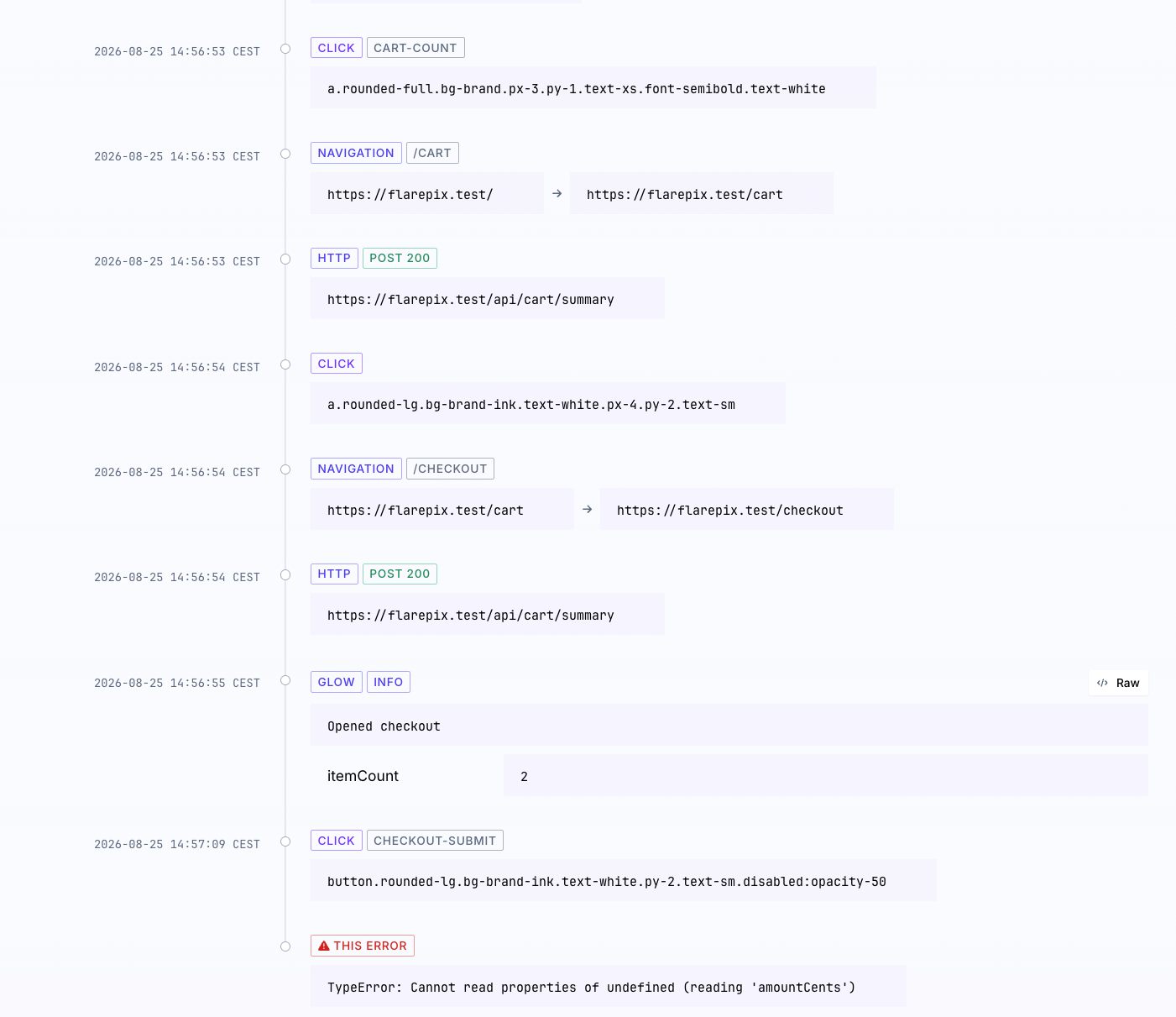
This is an example of the timeline for an exception during a checkout flow. You can follow the user's journey up until that point, which makes it easier for you to reproduce the exact scenario that led up to this error.
Turning it on
Breadcrumbs are off by default. You can turn them on in your Flare config like this:
flare.configure({
    enableBreadcrumbs: true,
});
By default we buffer the last 100 breadcrumb events. You can change this amount with maxBreadcrumbs.
For more information about automatic breadcrumb recording, head over to our docs.
How to integrate the client with a cookie banner
To integrate the JS client with a cookie banner library like Cookiebot you add these lines of code:
import { flare } from '@flareapp/js';

window.addEventListener('CookiebotOnAccept', () => {
    flare.light('YOUR PROJECT KEY'); // start the client
    flare.setConsent(true); // and allow sending
});

window.addEventListener('CookiebotOnDecline', () => {
    flare.setConsent(false); // withdrawal: stop all sends, drop buffers
});
The client defaults the consent to true so we won't break any existing install. If you want to start the client with consent disabled, you can always do the following:
import { flare } from '@flareapp/js';

flare.configure({ hasConsent: false }); // consent off
flare.light('YOUR PROJECT KEY'); // start js client

// nothing is sent to Flare, until this callback is called
window.addEventListener('CookiebotOnAccept', () => flare.setConsent(true));
// stop sending data when consent is revoked by the user
window.addEventListener('CookiebotOnDecline', () => flare.setConsent(false));
For more information about the consent option, head over to the docs.
Continue reading
Introducing: Dark mode for Flare
We heard you, so here it is: a Dark Mode for Flare!

Dries
Every exception has a backstory: introducing previous exceptions in Flare
Flare now shows previous exceptions. Navigate the whole chain and see the stack trace of the exception that actually caused the failure.

Ruben
Subscribe to Backtrace, our quarterly Flare newsletter
No spam, just news & product updates